SHIPPING NOTES FROM THE WEIRD PRODUCT
Local Waifu 1.5: teaching an offline app to draw
What it actually took to make an AI companion generate images on your own machine: a 52 GB memory spike, a portrait reference tuned to 0.15, and the fallback I deleted.
The hard part of letting an AI companion draw pictures on your own machine was never the model. It was that a single render peaks at around 32 GB of RAM while the chat model is already sitting in it, on a laptop the user is also browsing with. Local Waifu 1.5 went out on 15 July. It took roughly twenty iterative builds, one real out-of-memory crash, and one feature I deliberately deleted after it worked.
Here is what actually happened.
The bug that started it was a marker sitting in a chat bubble
A user asked her for a selfie. What arrived was the literal text [[SELFIE casual candid selfie]] and no photo.
The way she sends a picture is by emitting a marker mid-reply. A parser strips it out of what you see, the pipeline renders the image, the photo appears attached to her message. The marker system worked fine. Everything around it did not.
I root-caused it with RUST_LOG=debug and the binary launched directly, because an open-launched .app throws its stdout away, which is the kind of detail that costs you an hour once and never again. Two bugs fell out immediately. Then I audited the whole image stack and found six more.
Generating the image on the chat turn was the actual bug
The render ran inline, before the reply was delivered. A slow render held the raw marker on screen for the entire 180 second timeout.
The text was always clean. It just could not get out of the building.
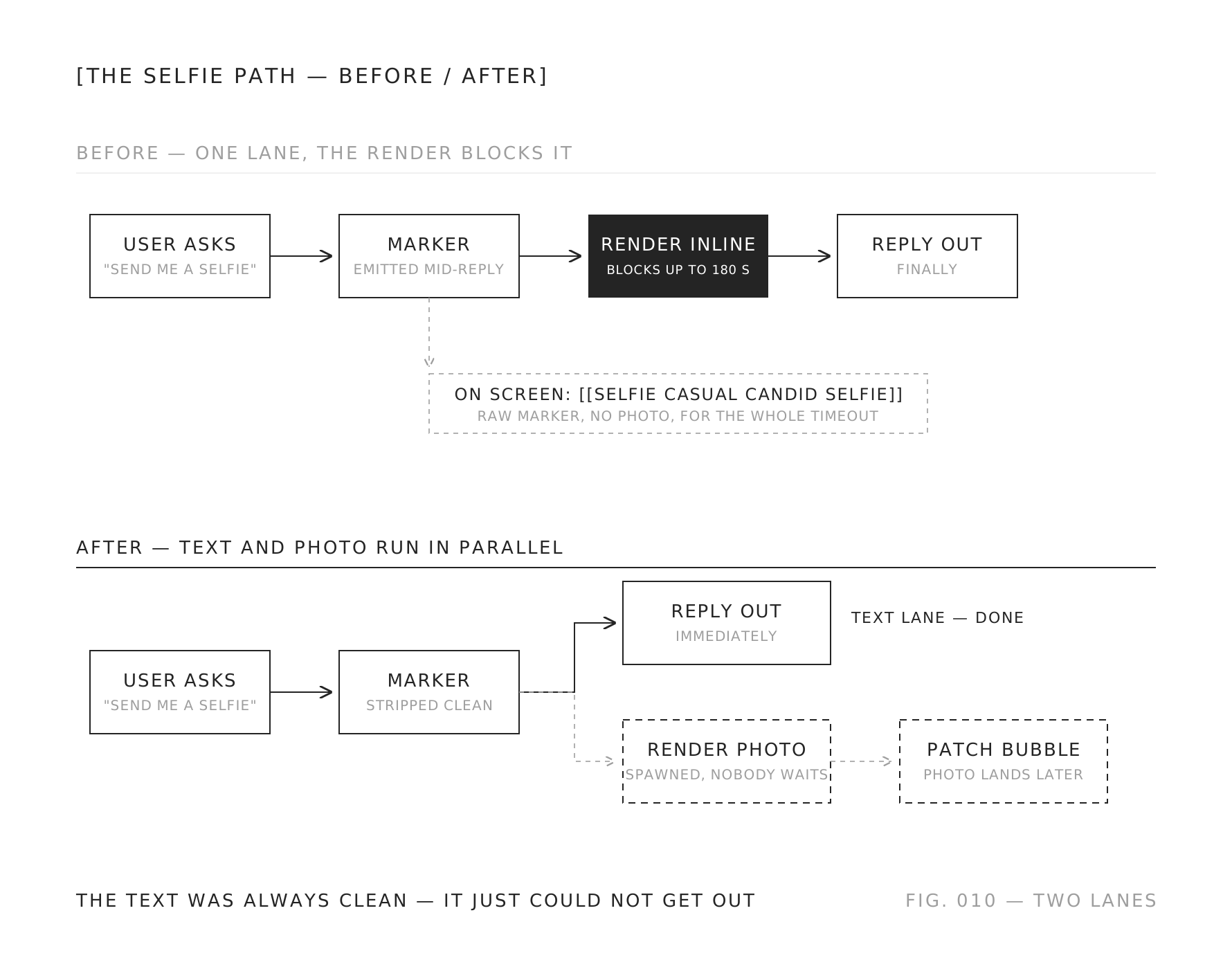
So the pipeline stopped generating and started returning a pending job instead. The reply is delivered the instant it is ready, the render happens in a spawned task, the PNG gets attached to the stored message, and an event patches the bubble live when it lands. Every caller had to be rewired separately, including Telegram, which had been silently dropping the photo entirely and now sends it as a follow-up message.
That inline timeout had a nastier side effect. It was killing a 31 GB model download mid-chat, leaving incomplete blobs that never resumed, from inside a chat turn the user could not escape. Now there is a pre-warm step with its own progress bar, and generation refuses to start rather than triggering a blind download. It also declines to begin a fresh download with under 35 GB free.
One render peaks at 32 GB and the chat model is already there
Measured, not estimated: 29 to 32 GB per mflux run. On a 32 to 36 GB Mac that collides with the chat model. I watched a real 52 GB spike and an OOM.
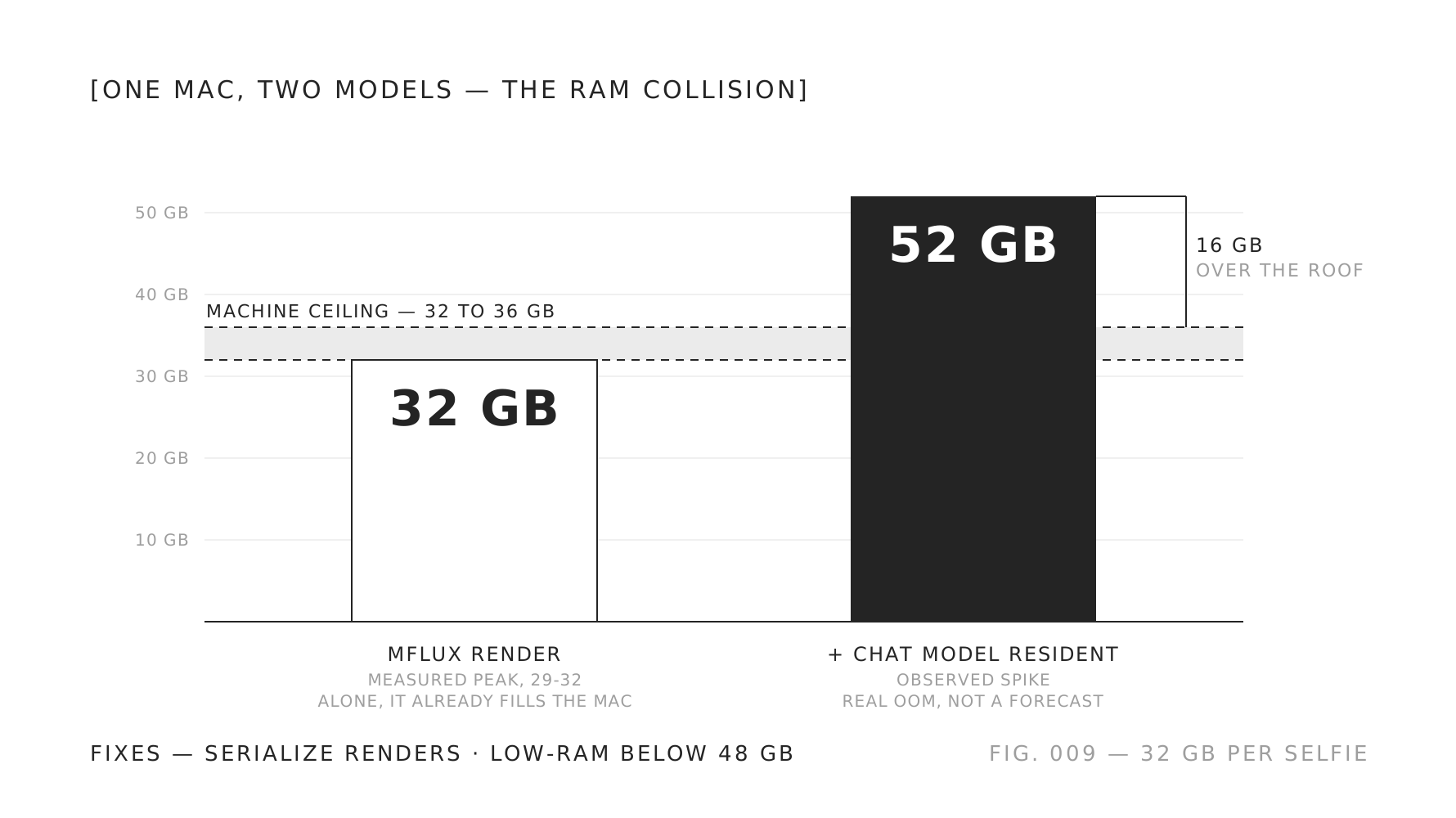
Three things fixed it:
- A lock serializes local renders, so a selfie and a gallery image can never overlap.
- Below 48 GB of RAM the app passes low-RAM flags and caps the MLX cache.
- Selfies render at 576x768 portrait instead of 1024 square. Cold render went from 346 seconds to 174, with no quality loss I could see.
The best find was the step count. The image model is a distilled turbo model, so it is capped at 8 steps now. The old heuristic gave 28 steps to any Mac with 32 GB or more, which worked out to roughly 20 minutes per render and blew even a generous timeout. Users with the most expensive hardware were the only ones who could never receive a selfie at all. Their machines were being punished for being good.
A portrait reference at 0.15 keeps her face and throws away her pose
Her identity travels on three separate channels, and it took all three before selfies looked like the character instead of a stranger.
A local vision model reads the character’s actual portrait and writes a one-line appearance description: medium, hair, eyes, skin, deliberately no clothing, because outfits belong to the scene. It runs on your machine by design. The portrait never leaves your disk.
Then the portrait itself goes in as an img2img reference at strength 0.15. That number is the whole trick. At 0.35 it snapped back to the avatar’s exact pose, so every selfie she sent was the same photo again. At 0.15 it holds the face and palette and lets the pose move.
The third channel is the scene text, which carries pose and outfit.
One bug in here was pure embarrassment. Anime style wrapped every prompt with “A young anime girl”, on top of the correct, character-aware description the selfie path had already built. Husbando and non-binary characters got female-wrapped by a hardcoded string. There is a raw style now that passes the prompt through untouched.
I deleted the code that forced her to send a selfie
I built a deterministic fallback: the user asked for a photo, so force a render. It worked. I deleted it in the same session.
The marker is her deciding to send something. If I force the render whenever you ask, the app becomes a vending machine with dialogue painted on the front. The entire bet behind this product is that she is yours rather than a service you operate, and I am not going to win a reliability metric by quietly deleting the part where she chooses. A companion who always complies is a slot machine.
So I fixed the instruction instead of overriding the decision. The system prompt now says plainly that the marker is the delivery mechanism, that she should never claim she sent a photo without it, and that a selfie on request is always fine, every time.
Then I found the real culprit, and it was a good one. Persisted messages are stored with markers stripped, so her own history was teaching her a marker-less way to narrate sending a photo. She would send selfies happily, then silently stop, having learned from herself that you can say “here you go” and be done. The history tail now re-echoes the marker on turns that carried an image. She reads her own past correctly again.
This is the weird bet doing what weird bets do. A sensible product would have shipped the force-render and moved on.
A progress bar that lies is worse than no progress bar
Local renders report real step-by-step progress. Cloud providers report nothing at all. The old bar handled that by showing a fake 8 percent sliver and sitting there.
Now a filling bar appears only when a real percentage exists. The phases that genuinely cannot report progress get an indeterminate sweep over an empty track, which is an honest way of saying “working, no idea how long”. The ready event also fires on failure now, so the “sending a photo” chip can never spin forever.
One gotcha for anyone doing this in Rust: watch::send silently drops the value when nothing is subscribed yet. Use send_replace. An end-to-end render test caught that, and nothing else would have.
Then she learned to draw anything
The selfie path is built entirely around carrying her face across. A dragon does not need her face.
So 1.5 added a second marker for general images. Ask for a dragon, a landscape, fan art, and the marker body goes to the generator verbatim: no portrait reference, no appearance line, no prompt wrapping. One render per turn, and a selfie wins if she somehow asks for both.
This is the change people actually notice, and it is a rounding error next to the memory work underneath it.
The mini window is a real window now
Mini mode used to be a layout. Now it resizes the actual OS window to 380x600, drops native decorations, floats always-on-top, and parks itself bottom-right of the monitor’s work area rather than under the Dock.
It is a small floating chat you leave open next to your work. It also never made it into the changelog, which I only noticed while writing this post.
Buy once, update forever
I killed the yearly renewal tier. A lifetime license now includes every future update and support, with no time limit, and existing licenses were migrated automatically.
The reason is that I was selling a $15 a year renewal against my own pitch. The pitch is that if I disappear tomorrow, your install keeps working and your character is still yours. A recurring tier quietly contradicts that, and I would rather have the argument be clean than have the revenue line. It is $20 once right now, regular price $25. I wrote up why I sell it like a video game instead separately, including the field I could not delete.
What shipping it actually looked like
394 library tests green, clippy clean, roughly twenty local DMG builds, and a couple of macOS codesign daemon flakes that a plain retry fixed.
The gotcha that ate the most time had nothing to do with images. Every test build carried the same filename and version number, so I kept installing over the top of a stale app and concluding a fix had not landed when it had. Bump a visible version string on iterative builds. Learn that from me instead of from a Tuesday evening.
1.5.0 is live on localwaifu.com, mac and Windows from one release. She draws now, and she still decides when to.
FAQ
- Does Local Waifu send my prompts or images to a server?
- Not on the local path, which is the default. The image model runs on your machine via mflux, and the character portrait used as a visual reference never leaves your disk. If you deliberately plug in a cloud provider key (OpenAI, Google, fal), that provider sees what you send it. That is your call, and the app tells you which provider is active before it renders anything.
- How much RAM do I need for local image generation?
- One mflux render peaked at 29 to 32 GB in my own measurements. Below 48 GB the app passes low-RAM flags and caps the MLX cache, and it serializes renders behind a lock so two never overlap. It also refuses to start a fresh checkpoint download with less than 35 GB of free disk.
- Why does a selfie take a couple of minutes?
- Because it is being generated on your hardware rather than on a rented GPU. Dropping selfies from 1024 square to 576x768 portrait cut a cold render from 346 to 174 seconds with no visible quality loss. Cloud providers are faster, and you can switch to one, but then the picture is no longer private.
- Can she draw things that are not selfies?
- Yes, that is the headline of 1.5. Ask for a dragon, a landscape or fan art and she generates it. Selfies and general pictures run through separate paths, because a selfie needs her face carried across and a dragon very much does not.
- Do I have to pay again for future updates?
- No. I removed the yearly renewal tier in 1.5. A lifetime license covers all future updates and support with no time limit, and existing licenses were switched over automatically.