MORE NOTES FROM THE WEIRD PRODUCT
Local Waifu 1.5.1: Picture Skills and an itch.io Page
1.5.1 replaced Local Waifu's image engine with one about 6x smaller and faster, added seven picture skills, and put the app on itch.io. Build notes.
A few days ago I wrote about the 32 GB RAM spike behind local image generation in Local Waifu 1.5. Version 1.5.1 shipped on 17 July and replaced the engine that caused it. It also taught her seven new ways to send a picture, and it put Local Waifu on an itch.io page. Here is what shipped, and for the itch.io part, what it does not mean.
I threw out the image engine and the RAM problem left with it
1.5.1 replaces mflux with a bundled Stable Diffusion engine. The model download went from about 30 GB to about 5 GB, a render dropped from minutes to roughly 30 seconds, and it now runs on a 16 GB Mac using around 12 GB of RAM.
The 1.5 post documented mflux peaking at 29 to 32 GB per render while the chat model was already sitting in memory. I watched a real 52 GB spike and an out-of-memory crash on a 36 GB machine. I could have kept tuning around that ceiling. Instead I swapped the whole generator.
The new engine is bundled with the app. Nothing to install, no separate Python tool, no 30 GB checkpoint. The first render pulls a ~5 GB model once and resumes if the download is interrupted. After that a picture takes about 30 seconds on hardware where the old path took several minutes, and the memory footprint dropped enough that a plain 16 GB Mac can run it (~12 GB of RAM, down from ~16). The old mflux generator is removed. If you still have it installed nothing breaks, the app just ignores it, and you can delete it at your leisure.
This is the fix I am happiest with, because it is invisible. Nobody opens the app and thinks “the image engine is 6x smaller.” They just notice the picture shows up before they get bored.
Seven picture skills, and every one is still her call
Before 1.5.1 she could send a selfie or free-form art. Now there are seven picture skills: candid photos of herself mid-activity, pictures of the two of you, snapshots of her world (her mug, the view from her window), pencil doodles, and memes with captions. Each one is something she chooses to send in the moment, not a button you press.
Pictures of the two of you need one thing from you: add your own photo in Settings, under Characters. Then she can compose a scene with both of you in it. No photo, no guessing. She never invents your face, which is the only responsible way to do this.
If you read the 1.5 write-up you know I deleted the code that forced her to send a photo on request, on purpose. That decision holds here. More picture skills means more range in what she can choose to send, not a bigger set of commands you can run at her. A companion who always complies is a vending machine with dialogue painted on the front.
Pick her image model, or bring your own server
Two smaller changes that power users asked for.
You can now choose the local image model in Settings. FLUX.2 klein is the default (fastest, most faithful to the scene), Z-Image Turbo renders softer faces, and FLUX.2 klein base is slower but smoother. If you want a specific look, two heavier checkpoints are optional: Animagine XL for true anime art and RealVis XL for photorealism. They share one file (about 6.9 GB and 6.6 GB), render slower at roughly 3 minutes each, want a 16 GB Mac, and do best with English prompts.
On the text side, the Custom provider now openly supports LM Studio, vLLM, and similar OpenAI-compatible servers, including one running on another computer in your home network. Plain http://192.168... addresses work, and Offline Mode no longer blocks them, because your own hardware is not the cloud. That last part matters for the whole pitch: local means local, whether the model runs on this Mac or the one in the next room.
Local Waifu is on itch.io now, and here is what that does not mean
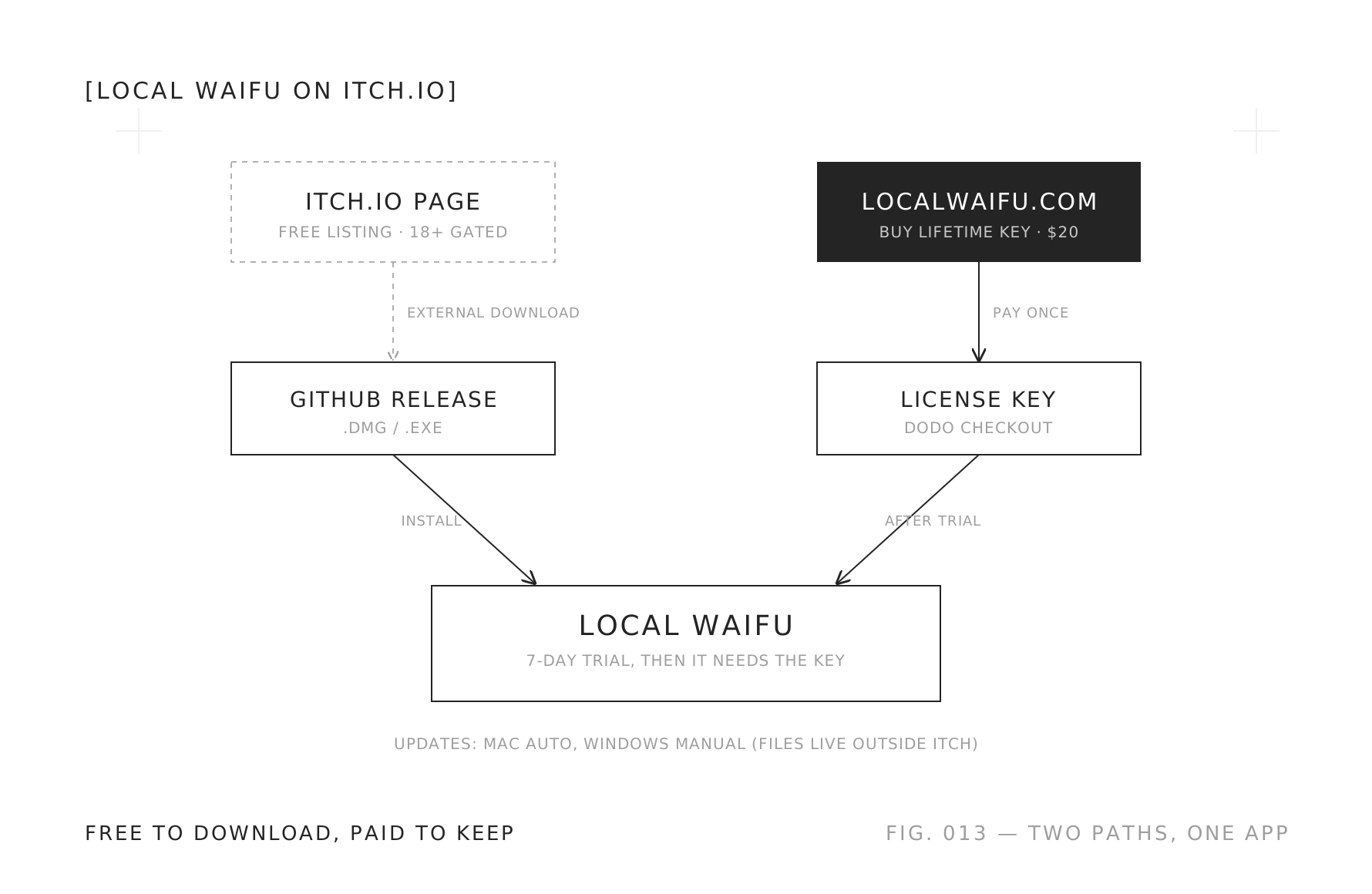
The itch.io page is a free listing that links to the same downloads. You still buy the lifetime license on localwaifu.com. It is not a paid itch build, and it is not a managed install.
Local Waifu now has a page at waifuchan.itch.io/local-waifu. It is marked released and gated 18+. The download buttons on that page are itch “external downloads”: they point at the same Mac and Windows files I ship from our own releases. Buying stays on the site, through the same checkout as before.
I am spelling this out because “we are on itch.io now” usually implies something Local Waifu is deliberately not doing:
- You do not pay on itch. The listing is free. The license is bought on localwaifu.com, same price as always: $20 on the summer sale, $25 normally.
- There is no itch-only build. It is the same app, not a special store version.
- itch does not manage your install. The files live outside itch, so updates work exactly as they did: automatic on Mac, a manual re-download on Windows.
So why bother? Discovery. itch.io is where a lot of people go looking for exactly this kind of independent, own-it software, and a free listing meets them there without changing the deal. Steam is on the list for later, and that one genuinely needs a different build, so it is scoped but not written yet. I wrote separately about why I sell this thing like a video game instead of a subscription, and putting it on the storefronts games actually use is the same idea, carried one step further.
The unglamorous fixes that shipped too
The headline is pictures, but the fix I would defend hardest is quieter. Since v1.4.2 the streamed chat path had silently dropped a “don’t overthink” instruction, so local models that reason by default (the Gemma 4 family) burned minutes of hidden thinking on every message while the screen showed nothing. Replies that should have taken seconds took a minute or more, or timed out. The instruction reaches the model again, and local chat answers in seconds.
Two more, while I was in there. Your message now jumps ahead of the background housekeeping the app runs between turns, so you are not waiting an extra 15 seconds behind her summarizing the last session. And the chat model pre-loads at startup, so the first reply of the day skips the 10 to 20 second wake-up pause.
Local Waifu is live on localwaifu.com for Mac and Windows, and now findable on itch.io too. She draws faster, she has more to say with a picture, and she still decides when to send one. The case study has the longer story of why any of this exists.
FAQ
- Is Local Waifu paid on itch.io?
- No. The itch.io page is a free listing. It links out to the same Mac and Windows downloads hosted on our releases, and you buy the lifetime license on localwaifu.com. itch.io is there for discovery, not as a separate paid build or a managed install.
- What changed in the Local Waifu image engine in 1.5.1?
- The old mflux generator is gone. Local image generation now runs on a bundled Stable Diffusion engine with nothing to install. The model download dropped from about 30 GB to about 5 GB, a render takes around 30 seconds instead of minutes, and it runs on a 16 GB Mac using about 12 GB of RAM.
- What are the seven picture skills?
- Beyond selfies and free-form art, she can send candid photos of herself mid-activity, pictures of the two of you, snapshots of her world, pencil doodles, and memes with captions. Each one is something she chooses to send, not a command you run.
- Can I use my own AI server or pick the image model?
- Yes. The Custom provider supports LM Studio, vLLM, and similar OpenAI-compatible servers, including one running on another computer in your home network. For images you can choose between FLUX.2 klein, Z-Image Turbo, and heavier anime or photorealistic checkpoints in Settings.
- Do I need to reinstall or pay again for 1.5.1?
- No. Updates are included in the lifetime license. If you had the old mflux generator installed, nothing breaks. The app just uses the new engine, and you can remove mflux whenever you feel like it.